You can add your Patreon.com creators to the extension with 5 ways. Before adding your creators we suggest to complete these 3 things first:
- Sign in to your Patreon.com account
- Subscribe to a Patreon.com creator
- Sign in to the browser extension within your browser
The first way is automatic and available only for Chrome users. Steps:
- Click the browser extension (Home tab) and click the 'Import creators from Patreon' button. Follow the instructions on the consent screen
All creators you currently support, or have supported in the past, will be added to the extension (Creators Tab) - Click the 'Downloads Page' button. It isn't required to have the Patreon.com page opened in your browser
The second way is also automatic. Steps:
- Sign in to https://patreon.cosmious.com
- Visit the My Creators page: https://patreon.cosmious.com/my-creators
- Click the 'Continue with Patreon' button in Import creators from Patreon section. Follow the instructions on the consent screen
All creators you currently support, or have supported in the past, will be loaded. You can choose which ones to add - Click the 'Downloads Page' in the browser extension
The third way is also automatic. Steps:
- Visit the Patreon.com creator's home page
- Click the browser extension (Home tab) and wait until the creator is detected
- Click the 'Downloads Page' button. The creator will be added to your creator's list. It isn't required to have the Patreon.com page opened in your browser
The fourth way is manual. Steps:
- Click the browser extension and then click the 'Add creators' button
- Type the creator's name in the search box and it will appear in the search results
- Click the 'Add creator' icon next to the creator's name and it will be added to your creator's list
- Click the 'Downloads Page' button
The fifth way is manual. Steps:
- Sign in to https://patreon.cosmious.com
- Visit the My Creators page: https://patreon.cosmious.com/my-creators
- The 'Add creators' section will appear
- Type the creator's name in the search box and it will appear in the search results
- Click the 'Add creator' icon next to the creator's name and it will be added to your creator's list
- Click the 'Downloads Page' in the browser extension
The 'Downloads Page' will gradually list the creator's available files.

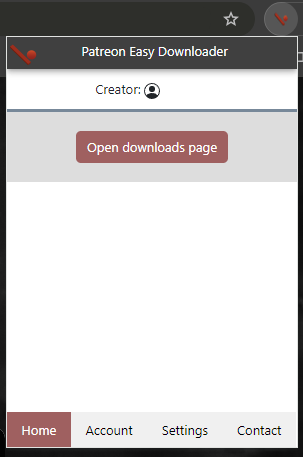 When a creator is found, the Downloads Page button will appear. Simply click the button and the Downloads Page will list the creator's files.